


Do you feel like your home is too hot in summer or too cold in winter? Does your energy bill seem too high? The problem might be your old thermostat. Many people want to upgrade to a new smart thermostat, but they don’t know if their house can handle it.
Don’t worry! In this guide, we’ll show you exactly how to tell if thermostat can be upgraded in house. We’ll keep everything simple and easy to understand. By the end, you’ll know if your home is ready for a new thermostat.
What Is a Thermostat?
A thermostat is like the boss of your heating and cooling system. It tells your heater when to turn on and off. It also controls your air conditioner. Think of it as a remote control for the temperature in your home.
There are three main types:
- Old Manual Thermostats: These have a dial or slider that you move by hand. They’re very simple but not very smart.
- Digital Programmable Thermostats: These have a screen and buttons. You can set them to change temperature at different times of the day.
- Smart Thermostats: These are the newest type. You can control them with your phone. They learn what you like and can save you money on your energy bills.
Why Upgrade Your Thermostat?
Before we learn how to tell if thermostat can be upgraded in house, let’s talk about why you might want to upgrade:
- Save Money: New thermostats can lower your energy bill by 10 to 20 percent.
- More Comfort: Smart thermostats keep your home at the perfect temperature.
- Easy Control: You can change the temperature from anywhere using your phone.
- Help the Earth: Using less energy is better for our planet.
Now let’s find out if your house is ready for an upgrade!
Step 1: Look at Your Current Thermostat
The first step is to look at the thermostat you have right now. Walk up to it and take a close look.
- If you see a round dial or a slider, you have an old manual thermostat. Good news! These are the easiest to upgrade. Almost any new thermostat will work in place of these old ones.
- If you see a digital screen with numbers, you have a programmable thermostat. These can usually be upgraded too, but we need to check a few more things.
- If you can already control it with your phone, you have a smart thermostat. You might not need to upgrade, but you could get a newer model with better features.
- Take a picture of your current thermostat with your phone. This will help later if you need to ask questions at the store.
Step 2: Check the Wires Behind Your Thermostat
This is the most important step to figure out how to tell if thermostat can be upgraded in house. Don’t worry – it’s safe and easy!
How to Look at the Wires
First, turn off the power to your heating and cooling system. Look for a switch near your furnace or air handler. Flip it to the “off” position. This keeps you safe.
Now, go back to your thermostat. Most thermostats have a cover that pops off. Gently pull the cover toward you. It should come right off.
Behind the cover, you’ll see the thermostat is attached to a white plate on the wall. You’ll also see wires going into the back of the thermostat. These wires are usually different colors.
Count Your Wires

Now count how many wires you see. This is very important!
- If you see 2 wires: Your system is very simple. Some new smart thermostats won’t work with only 2 wires, but there are special tricks to make them work. You might need help from an expert.
- If you see 3 or 4 wires: This is common in many homes. Most new thermostats can work with this, but you might need something called a “C-wire adapter.”
- If you see 5 or more wires: Perfect! Your house is ready for almost any new thermostat. You probably have all the wires you need.
What Are These Wires For?
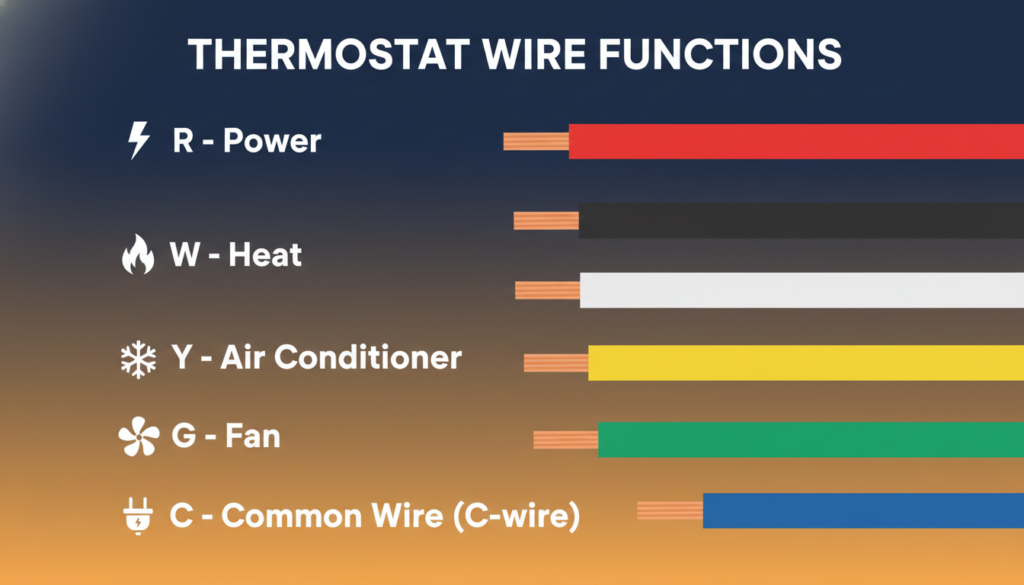
Each wire does a different job. Here are the most common ones:
- Red wire (R): This brings power to your thermostat
- White wire (W): This controls your heater
- Yellow wire (Y): This controls your air conditioner
- Green wire (G): This controls the fan
- Blue or black wire (C): This is called the “common wire” or “C-wire”
The C-wire is super important for smart thermostats. It gives steady power to the thermostat so it can stay on all the time.
Do You Have a C-Wire?
Look carefully at your wires. Do you see a blue or black wire connected to a terminal marked “C”?
- If yes: Great! Your house is ready for most smart thermostats.
- If no: Don’t give up! Many homes don’t have a C-wire, but there are ways to add one or work around it. Some smart thermostats come with a special adapter that fixes this problem.
Take a picture of your wires before you put the cover back on. Make sure you can see the colors clearly.
Step 3: Find Out What Type of Heating and Cooling System You Have
Different homes have different ways of heating and cooling. To know how to tell if thermostat can be upgraded in house, you need to know what system your home uses.

Heating Systems
Go to your basement or utility room. Look for a big metal box. This is probably your furnace or heating system.
- Gas Furnace: If you see pipes going to it and a small flame inside (look through a little window), you have a gas furnace. Almost all new thermostats work with gas furnaces.
- Electric Furnace: If you only see wires and no gas pipes, you have an electric furnace. These work with new thermostats too.
- Heat Pump: A heat pump looks like an air conditioner, but it heats AND cools your home. These are a bit trickier. Make sure the new thermostat you want says it works with heat pumps.
- Boiler: If you have radiators in your rooms with hot water running through them, you have a boiler. Some smart thermostats work with boilers, but not all of them. Check carefully before buying.
Cooling Systems
- Central Air Conditioning: If you have vents in your ceiling or walls that blow cold air, you have central AC. Most new thermostats work great with this.
- No Air Conditioning: Some homes only have heating. That’s okay! You can still upgrade your thermostat. Just make sure to pick one that says it works with “heating only” systems.
Check the Voltage
This part sounds complicated, but it’s not! Most home heating systems use something called “24 volts” or “low voltage.” This is what new smart thermostats need. Look at the sticker on your furnace or heating system. It should have numbers and information about voltage. If you see “24V” or “24VAC,” you’re good to go!
Warning: Some homes have “line voltage” systems. These use 110 volts or 240 volts. They’re usually found in apartments or homes with electric baseboard heaters. Regular smart thermostats DON’T work with these. You need a special high-voltage thermostat.
If you’re not sure about voltage, take a picture of the information sticker on your heating system. You can show it to someone at the store.
Step 4: Think About Your Home’s Age
The age of your home can tell you a lot about whether you can upgrade your thermostat.
- Newer Homes (Built After 2000): If your home is newer, great news! Newer homes usually have all the right wiring for smart thermostats. They almost always have a C-wire already installed.
- Medium-Age Homes (Built Between 1980-2000): These homes might have the right wiring, but not always. You’ll need to check your wires like we explained earlier. Many of these homes can still get smart thermostats, but you might need to add a C-wire or use an adapter.
- Older Homes (Built Before 1980): Older homes can be tricky. They might have old wiring or unusual heating systems. But don’t worry! Many people have successfully upgraded thermostats in old homes. You might just need help from a professional.
Step 5: Use Online Compatibility Checkers
Here’s a cool trick to figure out how to tell if thermostat can be upgraded in-house: many thermostat companies have free tools on their websites! These tools ask you questions about your heating system and wiring. Then they tell you if their thermostat will work in your home.
Popular Compatibility Tools
- Google Nest Compatibility Checker: Go to the Nest website and look for their compatibility checker. Answer a few questions about your wires and heating system. It will tell you if a Nest thermostat will work for you.
- Ecobee Compatibility Tool: Ecobee also has a great tool. It’s very easy to use. Just click on the colors of the wires you saw behind your thermostat.
- Honeywell Home Tool: Honeywell makes thermostats too, and they have a helpful compatibility tool on their website.
These tools are not perfect, but they give you a good idea. Have those pictures of your wires and heating system ready when you use these tools!
Signs Your House CAN Be Upgraded

Here’s a simple checklist. If most of these are true, your house can probably get a new thermostat:
- You have a 24-volt heating and cooling system
- You can see 4 or more wires behind your current thermostat
- Your furnace or heater was installed after 1990
- You have a standard gas furnace or electric furnace
- You have Wi-Fi internet in your home (for smart thermostats)
- Your current thermostat is attached to a wall (not portable)
If you checked most of these boxes, you’re in great shape!
Signs You Might Need Help
Some situations are more complicated. You might need help from a professional if:
- You only see 2 wires behind your thermostat
- Your heating system uses 110 volts or 240 volts (high voltage)
- You have electric baseboard heaters
- You have a very old heating system (from the 1970s or earlier)
- You have multiple thermostats controlling one heating system
- You rent an apartment and can’t change the thermostat
Don’t feel bad if you need help! Some heating systems are just more complicated. A heating expert (called an HVAC technician) can visit your home and tell you exactly what you need. This usually costs between 50 and 150 dollars.
Should You Install It Yourself or Hire Someone?
Now you know how to tell if thermostat can be upgraded in house. But should you install the new thermostat yourself, or should you pay someone to do it?
Installing It Yourself
Many people can install a new thermostat on their own. It’s not too hard if:
- You have 4 or more wires that match up with the new thermostat
- You’re comfortable working with small wires
- The instructions that come with your new thermostat are clear
- You can follow the step-by-step directions carefully
Most new thermostats come with very good instructions. Some even have videos you can watch on your phone while you work!
Hiring a Professional
You should probably hire someone if:
- You’re not comfortable working with wires
- You need to add a C-wire to your system
- Your heating system is complicated
- You tried to install it yourself, and it didn’t work
- You just want peace of mind knowing it’s done right
A professional installation usually costs between 100 and 300 dollars. This includes checking your system and making sure everything works perfectly.
Popular Smart Thermostats You Can Choose
Once you know your house can handle an upgrade, here are some popular choices:
- Google Nest Learning Thermostat: This is one of the most popular smart thermostats. It learns what temperatures you like and programs itself. It works with most homes that have a 24-volt system.
- Ecobee SmartThermostat: This one is great because it comes with a C-wire adapter in the box. If you don’t have a C-wire, this thermostat includes the parts to fix that problem.
- Honeywell Home T9: This is a good choice if you want to spend less money. It’s simpler than Nest or Ecobee but still works great.
- Amazon Smart Thermostat: This is the cheapest option. It costs less than 100 dollars but still has many smart features. It works with Alexa voice control.
Make sure whichever thermostat you pick says it works with your type of heating and cooling system!
How Much Does It Cost?
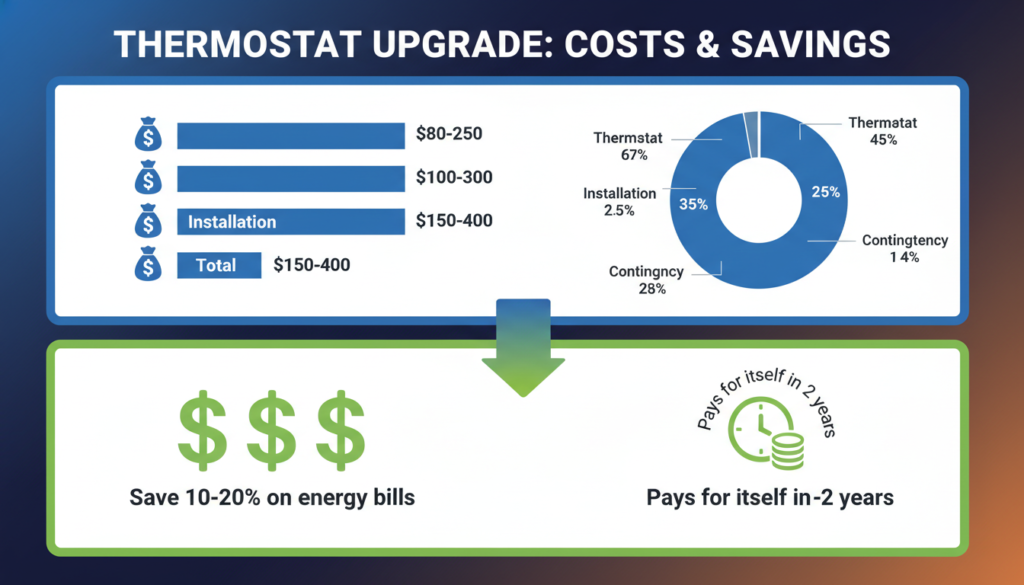
Let’s talk about money. How much will it cost to upgrade your thermostat?
- The Thermostat Itself: Smart thermostats cost between 80 and 250 dollars. Simpler ones cost less. Fancy ones with more features cost more.
- Installation: If you install it yourself, it’s free! If you hire someone, it costs 100 to 300 dollars.
- Extra Parts: If you need a C-wire adapter and your thermostat doesn’t come with one, it might cost 20 to 50 dollars extra.
Total Cost: Most people spend between 150 and 400 dollars total to upgrade their thermostat.
Will It Save You Money?
Yes! Even though it costs money at first, a smart thermostat can save you money every month. Most people save 10 to 20 percent on their heating and cooling bills. If your energy bill is 150 dollars per month, you could save 15 to 30 dollars each month. That means the thermostat pays for itself in about one to two years!
Some electric and gas companies even give you money back when you install a smart thermostat. Check with your utility company to see if they offer rebates. You might get 50 to 100 dollars back!
What to Do Next
Now you know how to tell if thermostat can be upgraded in house! Here are your next steps:
Step 1: Look at your current thermostat and take pictures.
Step 2: Carefully remove the cover and count your wires. Take pictures of the wires too.
Step 3: Find your heating system and look at the information sticker. Take a picture.
Step 4: Use an online compatibility checker from Nest, Ecobee, or Honeywell.
Step 5: If everything looks good, decide which thermostat you want to buy.
Step 6: Decide if you want to install it yourself or hire a professional.
Step 7: Buy your new thermostat and install it (or have someone install it for you).
Step 8: Enjoy your comfortable home and lower energy bills!
Common Questions
Do I definitely need a C-wire for a smart thermostat?
Not always! Many smart thermostats work without a C-wire if you have 4 or more other wires. Some thermostats come with an adapter that solves the C-wire problem. But having a C-wire makes everything easier and works better in the long run.
Can I install a smart thermostat by myself?
Yes, if you’re comfortable with basic home projects. Many people install their own thermostats. Just follow the instructions carefully. If you’re not sure, it’s better to hire a professional. A wrong installation could damage your heating system.
Will a smart thermostat work with my old furnace?
Probably yes! As long as your furnace uses 24 volts and was installed after 1980, most smart thermostats will work. Very old furnaces from the 1970s or earlier might have problems. Check the compatibility tool online to be sure.
What if I live in an apartment?
Talk to your landlord or building manager first. Some apartments don’t let you change the thermostat. Some apartments have special heating systems that can’t use smart thermostats. Ask for permission before you buy anything.
How long does installation take?
If you do it yourself, plan for about 30 to 60 minutes. If a professional does it, they can usually finish in 30 minutes or less. Adding a C-wire takes longer – maybe 1 to 2 hours.
Will my thermostat work if the Wi-Fi goes out?
Yes! If your internet stops working, your smart thermostat will still control your heating and cooling. You just won’t be able to control it from your phone until the Wi-Fi comes back. The basic heating and cooling features always work.
Can I go back to my old thermostat if I don’t like the new one?
Yes! Keep your old thermostat in a safe place. If you don’t like the new one, you can put the old one back on the wall. Just connect the same wires to the same places they were before.
Final Thoughts
Learning how to tell if a thermostat can be upgraded in-house is easier than most people think. By checking your wires, knowing your heating system type, and using online tools, you can figure it out in less than 30 minutes.
Most homes built after 1990 can easily upgrade to a smart thermostat. Even older homes can often be upgraded with a little extra help. A new thermostat makes your home more comfortable. It saves you money every month. And it’s better for the environment because you use less energy.
If you followed all the steps in this guide, you now know if your house is ready for an upgrade. Don’t be afraid to ask questions at the store or call a professional if you need help. Everyone starts somewhere, and upgrading your thermostat is a great first home improvement project!
Remember, regular HVAC maintenance helps your new thermostat work even better and saves more money.