
Nothing is more frustrating than walking into a hot house in the middle of a Lafayette summer, and and realising your AC thermostat not working. You turn it up, press every button, but nothing happens. The AC just won’t respond.
The good news? Most thermostat problems are easier to fix than you think. In many cases, it’s something as simple as dead batteries or a tripped circuit breaker. Other times, it might point to a deeper issue with your HVAC system.
In this guide, Fontenot Air Conditioning & Heating, Lafayette’s trusted HVAC experts, walk you through the most common reasons your AC thermostat stops working and the step-by-step fixes you can try right now. And if you’re dealing with bigger AC problems beyond the thermostat, check out our complete guide on common AC problems in Lafayette for a full breakdown.
How Does an AC Thermostat Work?
Think of your thermostat as the brain of your entire HVAC system. It reads the temperature in your home, compares it to your desired setting, and sends a signal to your AC unit to start or stop cooling.
When everything works correctly, this process is invisible; your home just stays comfortable. But when the thermostat fails, the entire system breaks down. Your AC might not turn on at all, or it might run nonstop without actually cooling your home.
Understanding this connection is important because sometimes what looks like a broken AC is actually just a thermostat issue, and vice versa. Before assuming your entire AC system is broken, always check the thermostat first.
Signs Your AC Thermostat Is Not Working
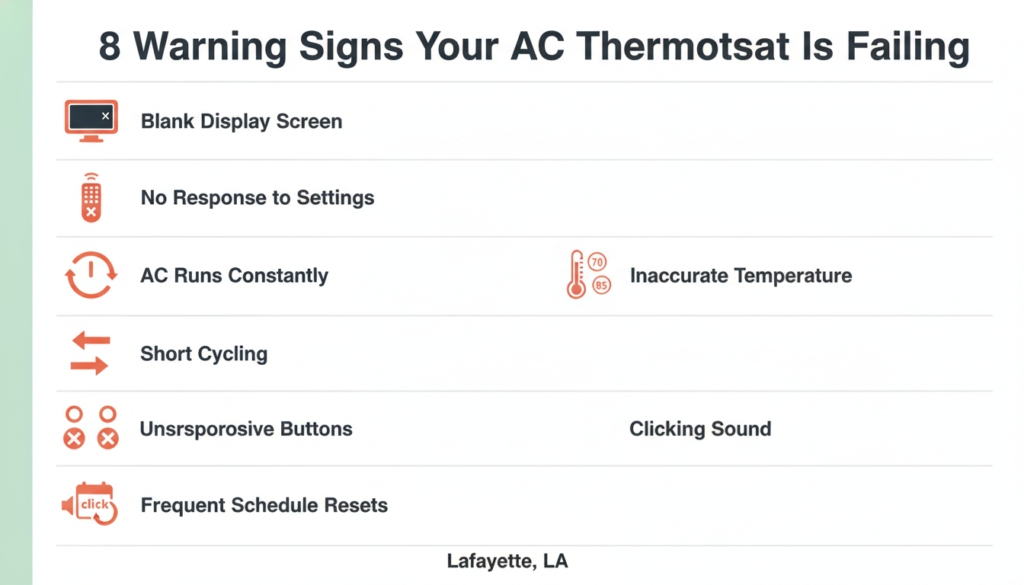
How do you know if your AC thermostat is bad? Here are the most common warning signs to watch for:
• Blank or dark display, the screen shows nothing at all
• AC won’t turn on even after you adjust the temperature setting
• AC won’t shut off and keeps running continuously
• The room temperature doesn’t match what the thermostat reads
• Short cycling your AC keeps turning on and off every few minutes
• Thermostat buttons are not responding when you press them
• Your programmed schedule keeps resetting on its own
• You hear a click from the thermostat, but the AC still doesn’t start
If you’re seeing any of these signs, keep reading. We’ll cover the cause and the fix for each one.
10 Common Reasons Your AC Thermostat Is Not Working
1. Dead or Low Batteries
This is the number one reason for a thermostat not responding or showing a blank screen. It sounds too simple, but it’s the first thing every HVAC technician checks, because it’s the most common fix.
Symptoms: Blank screen, unresponsive buttons, and display flickering.
The Fix: Open the battery compartment (usually on the back or side of the thermostat) and replace the old batteries with fresh AA or AAA batteries. After replacing, wait 30 seconds for the thermostat to reboot.
If the screen comes back and everything works normally, you’re done! If not, move on to the next possible cause.
2. Tripped Circuit Breaker
If your thermostat is hardwired (no batteries), power comes from your home’s electrical panel. A tripped breaker will cut power to your HVAC system entirely, including the thermostat.
Symptoms: Completely dead thermostat screen, entire HVAC system unresponsive.
The Fix: Go to your electrical panel and look for a breaker labelled “HVAC,” “AC,” “Furnace,” or “Air Handler.” If it’s in the middle or “OFF” position, flip it fully to OFF, then back to ON. Give your system 5 minutes to restart.
Important: If the breaker keeps tripping again within a short time, do not keep resetting it. This usually means there’s an electrical issue that needs a professional. Call Fontenot Air Conditioning & Heating in Lafayette right away.
3. Incorrect Thermostat Settings
Sometimes the thermostat itself is fine, it’s just set up incorrectly. This is especially common after a power outage or if someone else in the house accidentally changed the settings.
Symptoms: AC doesn’t cool, fan runs but no cold air, system seems to be doing nothing.
The Fix: Double-check these settings:
• Mode: Make sure it’s set to “COOL,,n ot “HEAT” or “FAN ONLY”
• Temperature: Set it at least 2–3 degrees lower than the current room temperature
• Fan Setting: “AUTO” means the fan only runs when the AC is cooling. “ON” means it runs constantly; this can make it feel like the AC isn’t working
In Lafayette’s humid heat, it’s easy to accidentally switch to “HEAT” mode and not notice until the house feels like an oven.
4. Dirty or Dusty Thermostat Sensors
Inside your thermostat is a small temperature sensor. Over time, dust, pet hair, and debris can build up around it, causing it to read the wrong temperature. This leads to short cycling, inconsistent cooling, or your AC running when it shouldn’t.
Symptoms: Incorrect temperature readings, AC short cycling, rand oom temperature never reaching the set point.
The Fix: Turn off the power to your thermostat. Gently remove the cover and use a soft brush or compressed air to carefully clean around the sensor and internal components. Don’t use wet cleaners or spray anything directly inside.
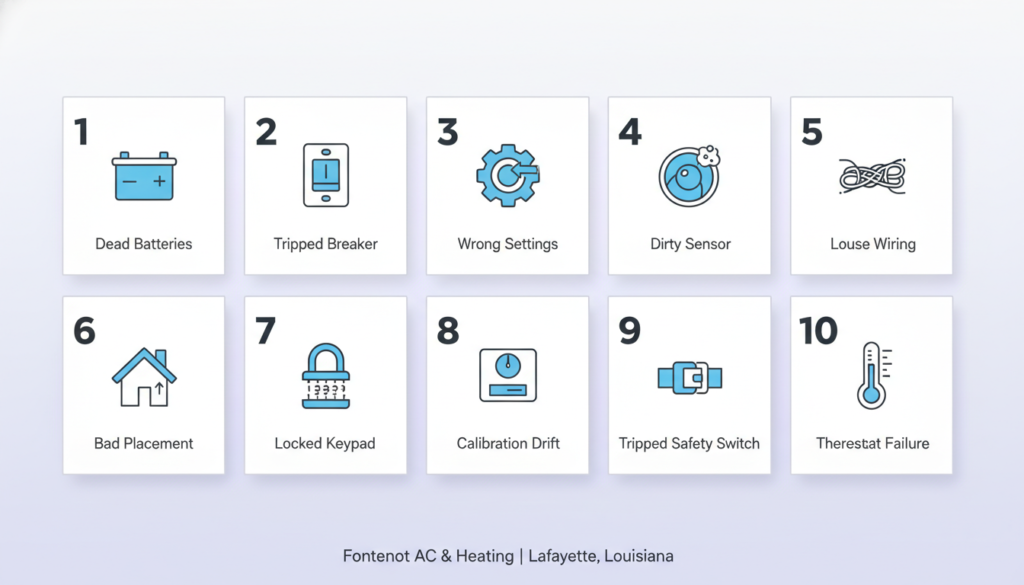
5. Loose or Faulty Wiring
Your thermostat connects to your HVAC system through a bundle of small wires. These wires carry signals that tell your AC when to turn on and off. If any wire becomes loose, corroded, or damaged, communication between the thermostat and your AC breaks down completely.
Symptoms: Intermittent operation, screen flickering, thermostat works sometimes but not others.
The Fix: Turn off the power at the circuit breaker first. Remove the thermostat faceplate and look at the wires. Check that each wire is firmly seated in its terminal. Look for any that appear burnt, corroded, or chewed by pests.
Warning: If you see damaged wiring, do not try to fix it yourself. This is a job for a licensed HVAC technician. Fontenot Air Conditioning & Heating serves all of Lafayette and the surrounding areas for exactly these types of repairs.
6. Poor Thermostat Placement
Location matters more than most homeowners realise. If your thermostat is placed in direct sunlight, near a window, next to a heat-producing appliance, or directly above an air vent, it will read inaccurate temperatures and make poor decisions about when to cool your home.
Symptoms: AC runs constantly, the house feels too warm or too cold despite correct settings, and energy bills are unusually high.
The Fix: The ideal thermostat location is on an interior wall, away from direct sunlight, vents, windows, and heat sources. If your thermostat is currently in a bad spot, a professional can relocate it.
In Lafayette, this is especially important, with strong sun and high humidity, a poorly placed thermostat can cause your AC to work much harder than necessary.
7. Thermostat Is Locked
Many modern thermostats, especially programmable and smart models, have a built-in child lock or keypad lock feature. When activated, no buttons will respond, making it look like the thermostat is completely broken.
Symptoms: The thermostat screen is lit and functioning, but the buttons do not respond to any input.
The Fix: Check your thermostat’s manual for how to unlock it. On most models, holding the “+” and “−” buttons simultaneously for 5 seconds will toggle the lock. For smart thermostats like Nest or Ecobee, check the settings menu.
8. Calibration Problems
Over time, the temperature sensor inside your thermostat can drift and become miscalibrated. This means your thermostat thinks the room is a different temperature than it actually is, causing the AC to cycle incorrectly.
Symptoms: Room temperature is noticeably warmer or cooler than what the thermostat displays.
The Fix: Place an independent thermometer near your thermostat and compare the readings. If there’s a difference of 2°F or more, your thermostat may need to be recalibrated or replaced. Many thermostats have a calibration offset setting in the menu.
9. Tripped HVAC Safety Switch
Your indoor HVAC unit (usually in a closet, attic, or utility room) has a safety switch called a float switch or condensate overflow switch. If the drain pan fills with water, which is common in Lafayette’s humid climate, this switch trips and shuts down the entire system to prevent water damage.
Symptoms: AC suddenly stops working, the thermostat appears normal, but AC won’t start, and you notice water near your indoor unit.
The Fix: Find the float switch (it’s typically a small switch mounted on the drain pan near your indoor air handler). If the pan is full of water, drain it and reset the switch. Then check why the drain line was clogged. This usually means the condensate drain line needs to be cleaned.
10. The Thermostat Has Simply Failed
Every thermostat has a lifespan. Most last between 10 and 15 years. After that, the internal components, sensors, circuit boards, and display start to fail. If your thermostat is old and none of the above fixes has worked, it may simply be time for a replacement.
Symptoms: Multiple issues occurring at once, consistent problems despite troubleshooting, thermostat is 10+ years old.
The Fix: Replace your thermostat. This is actually a great opportunity to upgrade to a smart thermostat, which can save up to 30% on energy costs by learning your schedule and adjusting automatically.
Step-by-Step AC Thermostat Troubleshooting Checklist
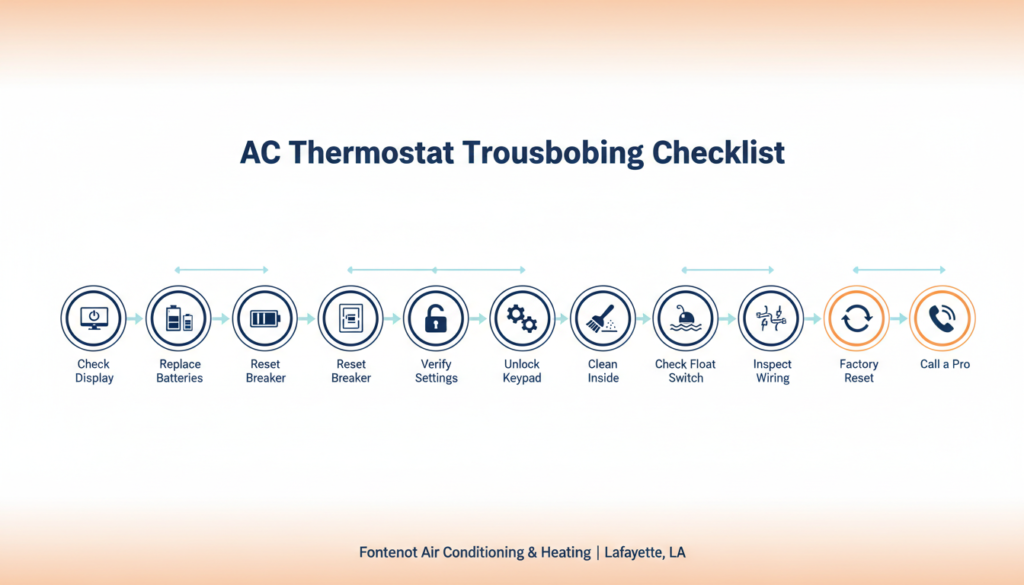
Follow these steps in order before calling a technician. This checklist covers the most common AC thermostat issues and takes about 15 minutes to complete.
1. Check the thermostat display. Is it blank or showing an error?
2. Replace the batteries with fresh ones, even if the display is working
3. Go to your electrical panel and check for a tripped HVAC breaker. Reset it if needed
4. Verify thermostat settings: Mode = COOL, temperature set below current room temp
5. Check if the keypad is locked and unlock it using the manufacturer’s instructions.
6. Remove the thermostat cover and gently clean the inside with a soft brush
7. Check for a tripped float switch near your indoor air handler
8. Inspect visible wiring for anything loose, burnt, or disconnected
9. Perform a factory reset on your thermostat (check the manual for steps)
10. If nothing works, call a licensed HVAC technician for a professional diagnosis
How to Reset Your AC Thermostat
Resetting your thermostat can clear glitches, restore default settings, and often fix unexplained issues. Here’s how to do it for different types:
Standard Digital Thermostat
Most digital thermostats have a reset button, usually a small pinhole on the front or side. Use a paperclip to press and hold it for 5 seconds. The display will go blank and reboot. After the reset, reprogram your settings.
Programmable Thermostat
Go into the settings or menu, look for a “Reset” or “Factory Reset” option, and confirm. This will erase all your programmed schedules and restore factory defaults.
Smart Thermostat (Nest, Ecobee, Honeywell Home)
Each brand has its own reset process. For Nest: Go to Settings > Reset > Schedule (or All Settings). For Ecobee: Main Menu > Settings > Reset. After resetting a smart thermostat, you’ll need to reconnect it to your Wi-Fi and set up your schedule again.
Circuit Breaker Reset (Works for All Types)
Go to your electrical panel and flip the HVAC breaker OFF. Wait 30 seconds, then turn it back ON. This power cycle can clear many software and communication errors.
When to Call a Professional HVAC Technician
Some thermostat and AC issues are beyond DIY fixes. You should call Fontenot Air Conditioning & Heating in Lafayette if:
• The circuit breaker keeps tripping repeatedly after being reset
• You find burnt, corroded, or damaged wiring inside the thermostat
• Your AC is short-cycling even after thermostat troubleshooting
• You replaced the thermostat, but the AC still doesn’t work
• There is water pooling around your indoor unit
• Your system is making unusual noise, grinding, squealing, or banging
• Your energy bills have suddenly increased without explanation
These signs often point to deeper AC problems like refrigerant leaks, compressor issues, or electrical faults that go beyond the thermostat. Our certified technicians serve Lafayette and the surrounding communities and are available for same-day service calls.
Should You Repair or Replace Your Thermostat?
Not every thermostat problem requires a full replacement. Here’s a quick guide to help you decide:
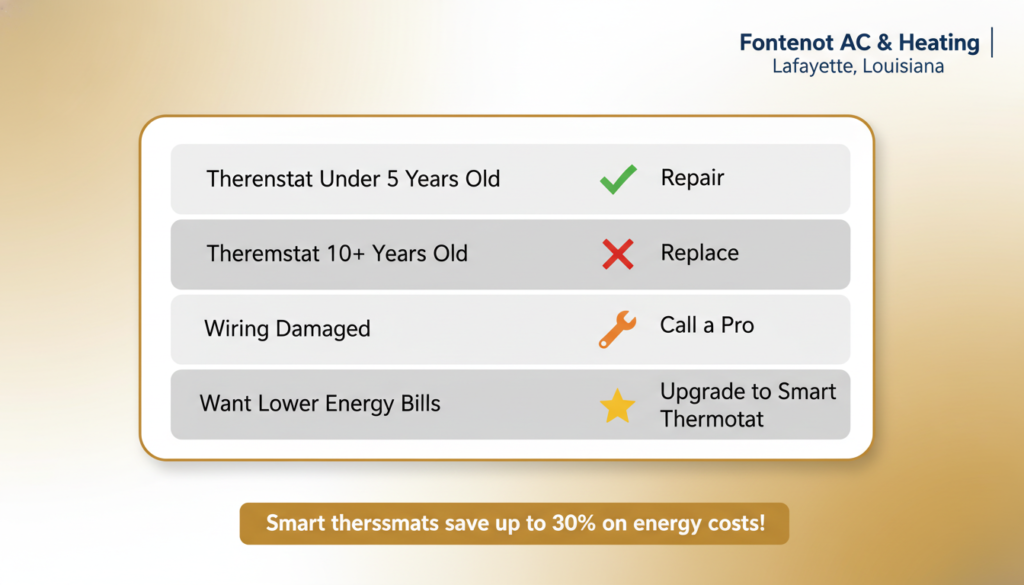
| Situation | Recommendation | Reason |
| The thermostat is under 5 years old | Repair or simple fix | Likely a minor issue, like batteries or settings |
| The thermostat is 10+ years old | Replace it | Internal components wear out over time |
| Wiring is damaged or corroded | Call a professional | Electrical issues need licensed repair |
| Problems keep coming back | Replace it | Recurring issues signal the end of its lifespan |
| You want lower energy bills | Upgrade to a smart thermostat | Smart models can save up to 30% on energy costs |
Pro Tip: If you live in Lafayette and your home uses a lot of energy to stay cool in the summer, upgrading to a programmable or smart thermostat is one of the best investments you can make. It pays for itself within a season or two.
Frequently Asked Questions About an AC Thermostat Not Working
Why is my AC thermostat not responding?
The most common reasons are dead batteries, a tripped circuit breaker, an activated keypad lock, or faulty wiring. Start by replacing the batteries and checking your electrical panel before moving on to more complex causes.
How do I know if my thermostat is broken or just needs batteries?
Replace the batteries first. If the screen comes back and the AC responds normally, you’re good. If replacing the batteries doesn’t help, and the screen stays blank,k or the AC still won’t respond, you’re likely dealing with a wiring issue or a failed thermostat.
Why does my thermostat click,k but the AC won’t turn on?
The click means your thermostat is sending a signal, so the thermostat itself may be working fine. The problem is most likely downstream: a blown fuse in the air handler, a tripped safety switch, a failed capacitor, or a compressor issue. This is a situation where you’ll want to call a professional HVAC technician.
Can a dirty air filter cause thermostat problems?
Yes, indirectly. A clogged air filter restricts airflow, causing your HVAC system to overheat and trip a safety shutoff. The system shuts down, and it can appear as though the thermostat stopped working. Always check your air filter when troubleshooting AC issues. In Lafayette’s dusty environment, filters should be changed every 1–3 months.
Why does my AC thermostat keep losing its settings?
If your thermostat keeps resetting its programmed schedule, it could be due to weak batteries, a power outage without battery backup, or a failing internal memory chip. Try replacing the batteries. If the problem continues, the thermostat likely needs to be replaced.
How long does an AC thermostat last?
Most thermostats last between 10 and 15 years with normal use. Smart thermostats tend to be more durable, but they can become outdated as technology changes. If your thermostat is older than 10 years and is causing frequent problems, replacement is usually the most cost-effective option.
Is it safe to replace a thermostat myself?
If your thermostat runs on batteries only and connects to a simple wire setup, a replacement is usually a manageable DIY project. However, if it’s hardwired into your electrical system or involves complex multi-zone wiring, it’s safer and often required by code to have a licensed HVAC technician handle the replacement.
What should I do if my AC thermostat is blank after a power outage?
First, check your circuit breaker and reset it if needed. Then replace the batteries, as power surges during outages can drain them. If the thermostat still won’t come on after power is restored, a surge may have damaged the internal components, and it may need to be replaced.
AC Thermostat Problems in Lafayette? Fontenot Is Here to Help
Living in Lafayette means dealing with some of the most intense heat and humidity in the country. When your AC thermostat stops working, you don’t want to wait. A malfunctioning thermostat can mean a sweltering home within hours.
Fontenot Air Conditioning & Heating has been serving Lafayette homeowners for years. Our certified HVAC technicians can diagnose thermostat issues, repair or replace your unit, and make sure your entire AC system is running at peak performance, so you stay cool all summer long.
We handle everything from simple thermostat swaps to full HVAC system repairs. Whether your thermostat needs new batteries or your compressor needs replacing, we’ve got you covered.
Call us today or schedule your service online. We offer same-day appointments throughout Lafayette and the surrounding communities.
Final Thoughts
An AC thermostat not working is one of the most common HVAC complaints, and thankfully, most of the time it’s something simple. Dead batteries, a tripped breaker, incorrect settings, or a locked keypad fix the problem for the majority of homeowners.
But when the simple fixes don’t work, it’s a sign of something deeper, wiring issues, a failed thermostat, or a bigger problem within your AC system. Don’t ignore those signs.
If you’ve worked through this troubleshooting guide and your AC still isn’t responding, it’s time to call the professionals at Fontenot Air Conditioning & Heating in Lafayette. And if you want to learn more about other AC issues that could be affecting your home’s comfort, check out our comprehensive guide on common AC problems, the parent resource for everything HVAC-related in Lafayette.